Accounts Receivable: Setting Up Customer Profile
Back to all


Back to all
Import customers from an Excel file
If you have a spreadsheet with your customer info, you can import it into QuickBooks all at once.
To see how your Excel file should look, see below photo.

Import customers from an Excel file
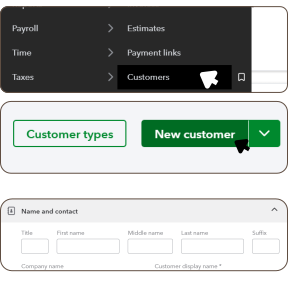
Go to Sales and select Customers.
Select the dropdown ▼ next to New customer, then select Import customers.
Select Browse.
Follow the steps to upload your Excel file, then select Next.
Map the fields in your file to the fields in QuickBooks Online, then select Next.
Select the customers to be imported, then select Import.
%20(Medium%20Banner%20(US)%20(Landscape))%20(4).svg)