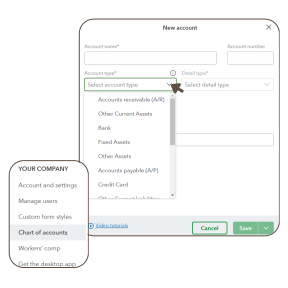
Select an Account type, and then choose the Detail type from the dropdowns.
If this account is a subaccount, check Make this a subaccount, then choose the Parent account it should be under.
If you choose a Bank, Asset, Credit card, Liabilities, or Equity account, enter Opening Balance, and fill out the starting date in the As of field.
(Optional) Add a Description to add extra information about this account.
Select Save.
CUSTOMIZE YOUR CHART OF ACCOUNTS
QuickBooks automatically sets up your chart of accounts, but you can customize it to meet your business needs. You can add or remove accounts, and make them active or inactive. You can also use account numbers any time, it is not required but your accountant may recommend them.