The floating balance is the balance displayed in the Banking screen in QuickBooks, reflecting transactions imported from your bank. It should match the QuickBooks balance if all transactions have been recorded and categorized correctly. If the balances do not match, it indicates that there are either missing, unrecorded, or uncategorized transactions.
How to Access the Banking Screen
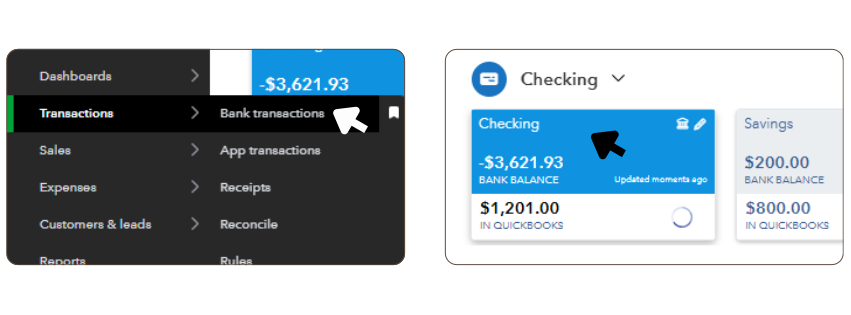
On the left hand-hand menu, select Transaction, then banking transactions.
Select the specific bank account you want to review.
Review the QuickBooks Balance vs. Bank Balance
At the top of the banking screen, you will see:
In QuickBooks: The balance according to the transactions recorded in QuickBooks.
Bank Balance: The balance according to your bank as per the most recent bank feed update.
If these balances match, then all transactions have been accounted for.
If they do not match, there may be uncategorized transactions, duplicate entries, or missing transactions.
Summary:
P&L statements help you analyze the performance of your business over a specific time period, whether that be a month, a quarter, or a year, and provide a clear picture of your current cash flown as well as insights into your future business performance.
What Is A Profit and Loss Statement?
A P&L statement tells you how much money you’re making, and how much you’re losing. You can use a P&L statement to look at your profits and losses over any period you like, but they’re most commonly created for a month, quarter or year.
How to Run A P&L Report
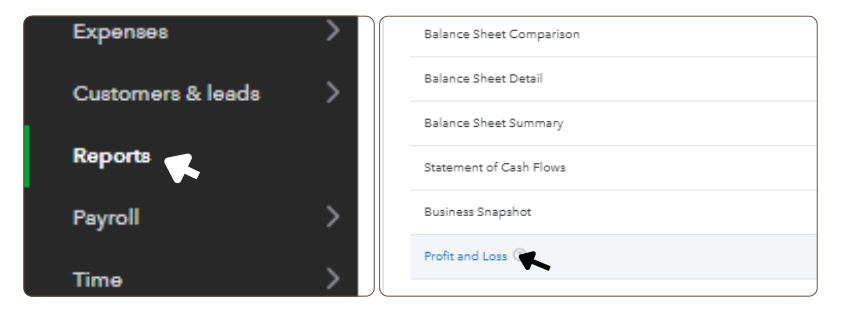
On the Left hand side select Reports.
Under the Business overview section select Profit and Loss.
Modify the reporting period to a specific month.
Select Run report.
Review the Reports for Negative Balances
Review the Profit and Loss report to identify any negative amounts:
Income accounts should usually have a positive balances. A negative balance could indicate a return or error.
Expense accounts typically show positive values (expenses incurred). A negative balance here might imply incorrect entries, overpayments, or refunds.
If you notice any negative balances:
Click on the negative amount to drill down into the transactions that make up that total.
Review and correct any errors or incorrect entries.
Summary:
A Balance Sheet report gives you a financial snapshot of your company as of a specific date. It calculates how much your business is worth (your business’s equity) by subtracting all the money your company owes (liabilities) from everything it owns (assets):
Assets - Liabilities = Equity
How to Run A Balance Sheet Report
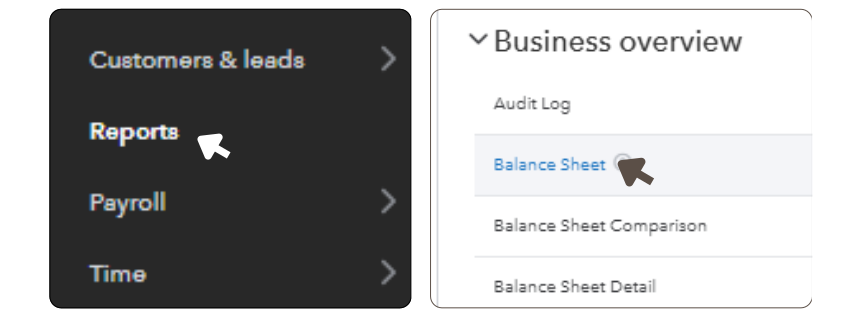
Go to Reports.
Under the Business overview section select Balance Sheet.
To see a higher-level summary, run the Balance Sheet Summary report instead.
Identifying BS Report Accounts with Negative Balances
Review the report to see if any accounts have a negative amount in the balance column
Assets and Equity accounts should not have negative balances under normal circumstances.
Liabilities can have negative balances in certain cases.
To see more details:
Click on the amount of any account showing a negative balance to see the underlying transactions.