Accounts Payable: Managing Payments
Back to all


Back to all
How to See your bill payment details
You always have access to your bill payments, including their status, on the Bill Pay payments page.
From the Bills page, you may see all paid and unpaid bills. In the Paid tab, you will see all completed bill.
%20(Medium%20Banner%20(US)%20(Landscape))%20(2).svg)
Payment processing times
Standard Delivery times:
ACH: 3-5 business days
Check: 8-10 business days
Delivery times can vary due to third party delays or risk reviews
Faster ACH Payments
Eligible QuickBooks Bill Pay users can choose Faster ACH Payments to schedule bill payments to be paid in 1 business day (excluding weekends and federal holidays). For example, if you schedule a bill payment with the Faster ACH payment for Tuesday, December 12th, it'll be paid out to your vendor on Wednesday, December 13th.
Faster ACH Payments
How to Cancel A Scheduled Bill Payment
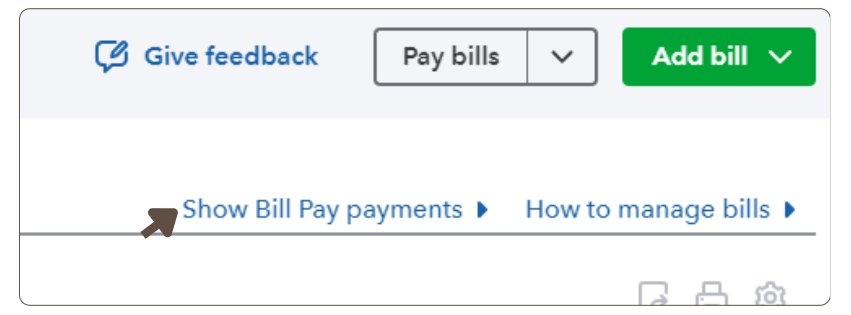
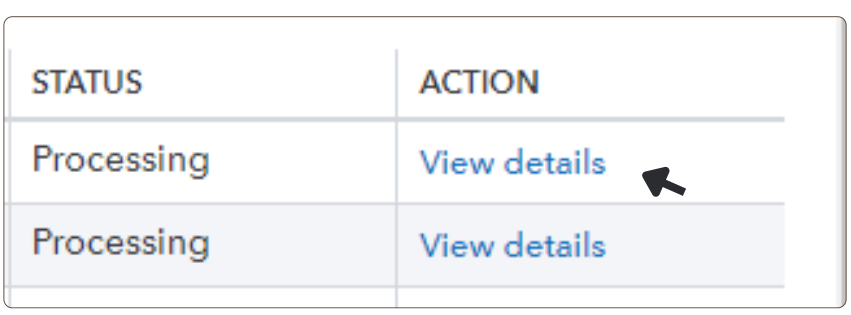
3. Choose the scheduled bill payment from the list, then select
View details.
4. Select Cancel this payment.
ELEVATE INSIGHTS
You can only cancel a scheduled bill payment before 12am on the withdrawal date noted in the confirmation email sent to you after you schedule a Bill Payment.